About Bangkok Bank Mobile Banking
With the Bangkok Bank Mobile Banking app, your banking transactions are more convenient with these features: • View all types of deposits, credit cards, mutual funds, government bonds and Bualuang loan accounts • Request
With the Bangkok Bank Mobile Banking app, your banking transactions are more convenient with these features:
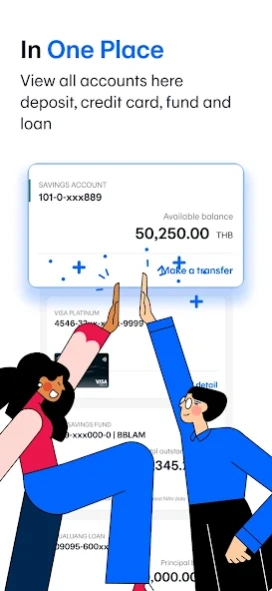
• View all types of deposits, credit cards, mutual funds, government bonds and Bualuang loan accounts
• Request Thai baht and FCD account statements
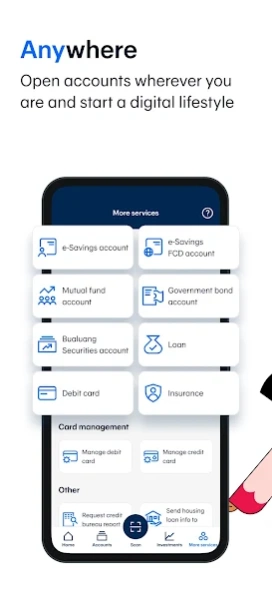
• Open an e-Savings account
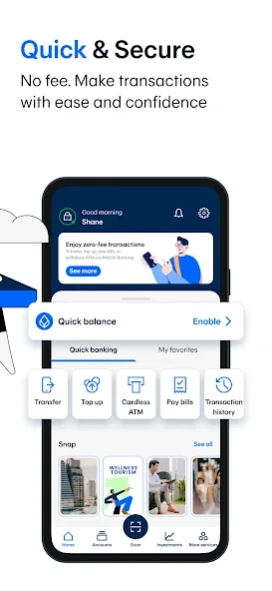
• Make cardless withdrawals at Bangkok Bank and KBank ATM and Banking Agents (7-Eleven, Thailand Post offices, Sabuy Counter and TermDee kiosk)
• Invest in mutual funds, government bonds and corporate debentures
• Make a Bualuang home loan payment and request the Bank to submit housing loan information to the Revenue Department for a convenient tax deduction claim
• Add a Foreign Currency Deposit Account (FCD) and transfer funds to your own FCD account
• Make an international funds transfer via SWIFT with 18 currencies for 135 countries
• Make an international funds transfer to Singapore via PromptPay International
• Send and receive money to or from more than 200 countries via Western Union
• Buy insurance and check my policies
• Check the balance of and top up your Rabbit LINE Pay and view BTS trip history
• Apply for and manage the following banking services:
- Request and activate a debit card
- Apply for a Bangkok Bank Credit Card – choose the card that fits your lifestyle then upload the relevant documents and check your approval status in the app
- Request to open a Securities Trading Account with Bualuang Securities
- Register for direct debit service
- Register/edit/deregister with PromptPay
- Suspend debit card/credit card
- Renew debit card
- Request a Bualuang Home Loan
- Request a Credit Bureau Report
- Lock and Unlock accounts to prevent transfers, top ups and payments
• QuickPay – scan to pay merchants without a mobile PIN
• Scan a QR Code for payment with a Widget
• Change your registered mobile number/email
How to apply:
For customers without a Bangkok Bank account
• Open an e-Savings account and apply for mobile banking services in the app
For customers with a Bangkok Bank account
• Download the application and apply with your Bangkok Bank deposit account, debit card or credit card.
• Visit any Bangkok Bank ATM or branch to get a temporary PIN to log in to the application.
For further assistance please call 1333 or (66) 0-2645-5555 or visit www.bangkokbank.com/mobilebanking
Head Office: 333 Silom Road, Silom, Bang Rak, Bangkok 10500
Disclaimer: The use of this application is for prospective customers and customers of Bangkok Bank only and this application shall not be used for any illegal purpose.
Previous Versions
Here you can find the changelog of Bangkok Bank Mobile Banking since it was posted on our website on 2014-11-12 22:18:13.
The latest version is 3.50.1 and it was updated on 2026-10-10 18:43:13. See below the changes in each version.
Bangkok Bank Mobile Banking version 3.49.2
Updated At: 2026-09-01
Changes: Update the app to get better experiences with new features and products that make your life easier
• View the status and performance of your investment portfolio with Bangkok Bank
• Enable or disable scan to pay abroad anytime
• Improved overall app performance
Bangkok Bank Mobile Banking version 3.50.1
Updated At: 2026-09-01
Changes: Update the app to get better experiences with new features and products that make your life easier
• Added a location permission request when scanning a QR code to pay at overseas merchants
• Add a face scan verification step when scheduling a transaction
• Lock and limit overseas credit card spending both via EDC machine and contactless physical card
• Register for a consultation about Bualuang Home Loan and Home Equity Loan
• Improved overall app performance
Bangkok Bank Mobile Banking version 3.48.2
Updated At: 2026-05-12
Changes: Update the app to get better experiences with new features and products that make your life easier
• Easily track and manage expenses for solo and group trips with Trip Space
• Add a facial scan verification step when a transfer between Mobile Banking users, by mobile number, reaches your set limit
• Contact Bangkok Bank Call Center via internet calling
• Improved overall app performance
Bangkok Bank Mobile Banking version 3.47.2
Updated At: 2026-03-05
Changes: Update the app to get better experiences with new features and products that make your life easier
• Switch LTF units to open-ended funds
• Improved overall app performance
Bangkok Bank Mobile Banking version 3.46.0
Updated At: 2025-12-15
Changes: Update the app to get better experiences with new features and products that make your life easier
• A face scan verification step has been added for cardless ATM withdrawals when your daily limit reaches 50,000 baht, or when you reach your personal set limit
• Get notified whenever money goes out of your account
• Improved overall app performance
Bangkok Bank Mobile Banking version 3.45.0
Updated At: 2025-11-04
Changes: Update the app to get better experiences with new features and products that make your life easier
• Cardless withdrawals at GSB ,KTB and SCB ATM
• Improved overall app performance
Bangkok Bank Mobile Banking version 3.44.0
Updated At: 2025-09-15
Changes: Update the app to get better experiences with new features and products that make your life easier
• Apply for Be Together Smart Return 789 savings insurance from AIA.
• “Financial buddy”. Find all of our products and promotions in one place
• Added a face scan verification step when making a payment or top up that reaches your set limit
• Improved overall app performance
Bangkok Bank Mobile Banking version 3.43.1
Updated At: 2025-08-20
Changes: What’s New:
• Strengthen the application’s security
• Improve overall app performance
Disclaimer
Official Google Play Link
We do not host Bangkok Bank Mobile Banking on our servers. We did not scan it for viruses, adware, spyware or other type of malware. This app is hosted by Google and passed their terms and conditions to be listed there. We recommend caution when installing it.
The Google Play link for Bangkok Bank Mobile Banking is provided to you by apps112.com without any warranties, representations or guarantees of any kind, so access it at your own risk.
If you have questions regarding this particular app contact the publisher directly. For questions about the functionalities of apps112.com contact us.